
APIs are the backbone of modern web development. And if you’ve ever worked with them, you know they can be both a blessing and a curse. One minute, your API is responding beautifully. The next, you’re staring at a cryptic error message wondering if you should just abandon tech altogether and become a farmer.
Enter Postman —the unsung hero that saves developers from endless frustration. If you’re building, testing, or debugging APIs, Postman is like having a superpower. You get to send API requests, automate tests, manage environments, and even pretend you know what you’re doing when debugging an issue in front of your team.
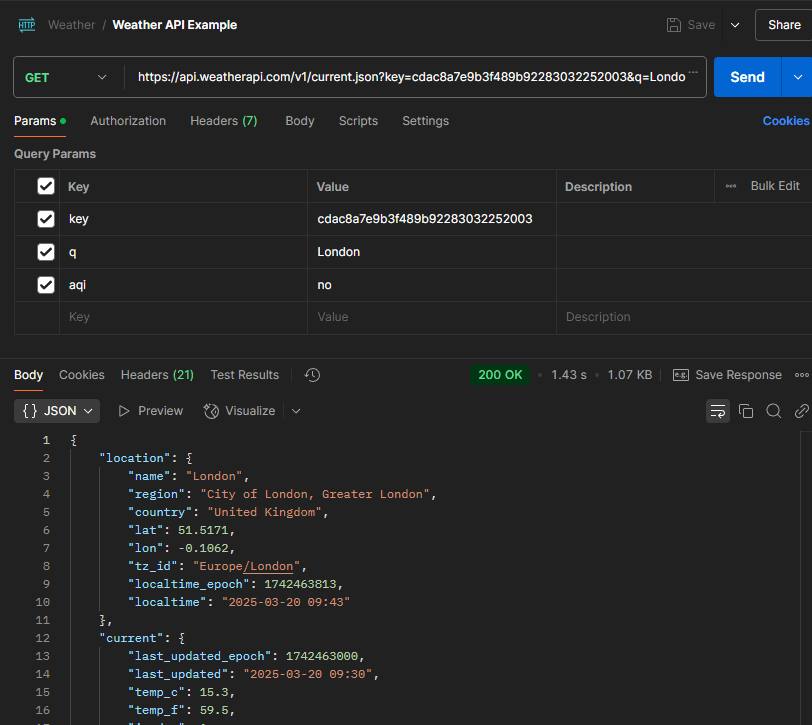
Let’s dive into why Postman is a must-have for any developer working with APIs, plus a little demo using a weather API!
What’s Postman?
Postman is an API platform that helps developers design, test, and document APIs without needing to write scripts for every single request. Think of it as a browser for APIs—except instead of scrolling through memes, you’re sending GET and POST requests like a pro.
Key Features That Make Postman Awesome:
1. A User-Friendly Interface That Even Your Manager Could Use
Postman makes sending API requests ridiculously easy. Instead of writing raw cURL commands or scripting everything from scratch, you just click a few buttons, add your headers, parameters, and body, and boom—request sent.
2. Collections: Because Organizing API Calls Shouldn’t Be a Nightmare
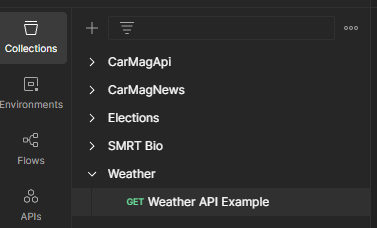
With Collections, you can neatly group related API requests together. No more digging through old requests or retyping URLs from scratch. You can even chain requests together to simulate workflows.
3. Automated Testing: Let Postman Do the Boring Work for You
Postman supports Pre-request Scripts and Test Scripts using JavaScript. This means you can automate validations, check API responses, and even run tests before pushing changes to production (so you don’t break everything).
4. Environments & Variables: Stop Hardcoding Everything
Switching between development, staging, and production environments? Postman’s environment variables make it super easy. No more manually changing base URLs or authentication tokens—just select an environment, and Postman handles the rest.

5. Mock Servers: Because APIs Are Never Ready When You Need Them
Need to test an API that doesn’t exist yet? No problem! Postman’s Mock Servers let you simulate API responses so you can start developing your front end before the backend is complete.
6. API Documentation: Stop Sending Confusing Excel Sheets
Tired of documenting APIs manually? Postman lets you generate and publish interactive API docs that other developers can use—no need for long-winded explanations or messy spreadsheets.
7. Monitors: Keeping Your APIs in Check 24/7
With Postman Monitors, you can schedule API tests at regular intervals to ensure everything is working as expected. Because nothing’s worse than waking up to an angry email saying your API has been down for hours.
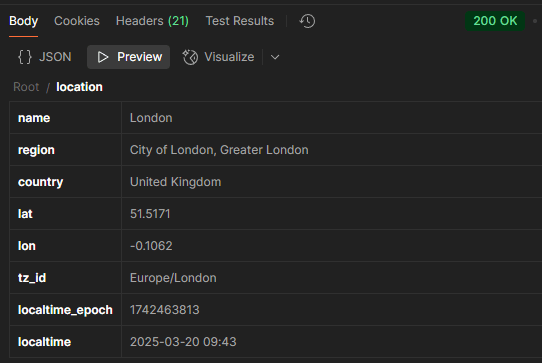
You can preview the JSON response right in Postman, switch to Pretty mode for better readability, or use the JSON viewer to inspect nested data more easily.
How Postman Has Made My Life Easier
- Faster Debugging – No need to manually write scripts just to test an API endpoint. I can send requests instantly and debug on the spot.
- Efficient Collaboration – Sharing Collections with my team means we’re all working with the same API setup—no “It works on my machine” nonsense.
- Automating Repetitive Tasks – Using test scripts, I can automate validation checks instead of doing them manually (because life is too short for repetitive tasks).
- Handling Authentication Without Pain – Managing API keys and tokens is a breeze, so I don’t have to copy-paste them into every request like a caveman.
Common Pitfalls & How to Avoid Them
- Issue: Getting a 401 Unauthorized Error
Check if your API key or authentication token is correctly set in the headers.
- Issue: API Returns a 429 (Too Many Requests) Error
Some APIs have rate limits. If you hit the limit, try again later or upgrade your API plan.
- Issue: JSON Response Looks Messy or Unreadable
Switch to Pretty mode or use the JSON viewer for better readability.
If you work with APIs and you’re not using Postman, you’re making life harder than it needs to be. It’s like trying to dig a hole with a spoon when you have a shovel right next to you.
Whether you’re debugging requests, testing authentication, or automating API tests, Postman makes everything smoother, faster, and less painful. So go ahead, give it a shot—you’ll thank me later.
Subscribe to Mo’s blog to stay updated on my latest posts, tips, and insights for developers and tech enthusiasts. Don’t miss out—join the journey today!



 Days in the Life of Mo
Leave a Reply